Container
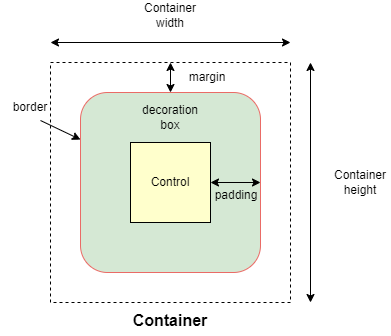
Container allows to decorate a control with background color and border and position it with padding, margin and alignment.
Examples
Clickable container
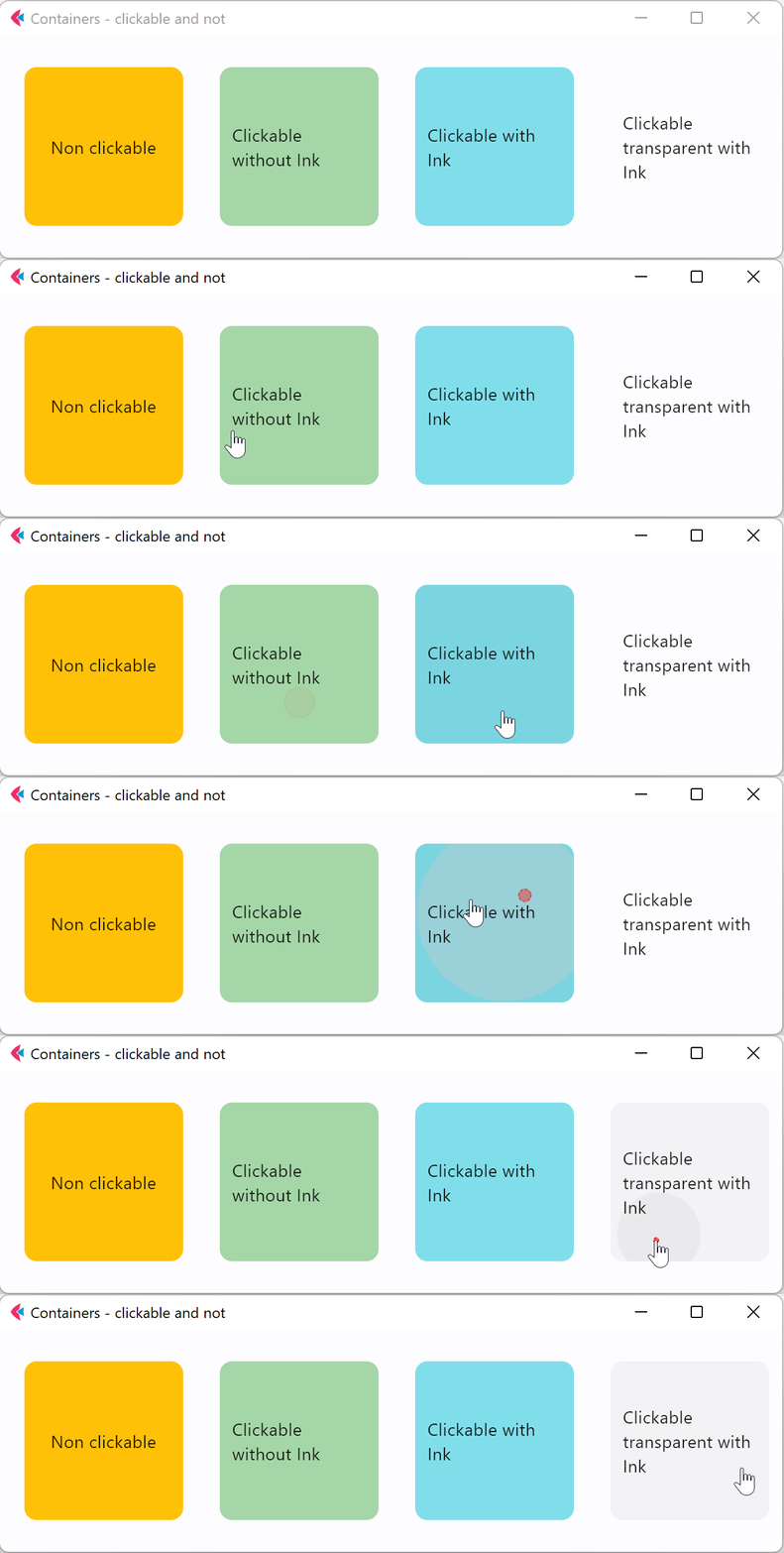
- Python
import flet as ft

def main(page: ft.Page):
    page.title = "Containers - clickable and not"
    page.vertical_alignment = ft.MainAxisAlignment.CENTER
    page.horizontal_alignment = ft.CrossAxisAlignment.CENTER

    page.add(
        ft.Row(
            [
                ft.Container(
                    content=ft.Text("Non clickable"),
                    margin=10,
                    padding=10,
                    alignment=ft.alignment.center,
                    bgcolor=ft.colors.AMBER,
                    width=150,
                    height=150,
                    border_radius=10,
                ),
                ft.Container(
                    content=ft.Text("Clickable without Ink"),
                    margin=10,
                    padding=10,
                    alignment=ft.alignment.center,
                    bgcolor=ft.colors.GREEN_200,
                    width=150,
                    height=150,
                    border_radius=10,
                    on_click=lambda e: print("Clickable without Ink clicked!"),
                ),
                ft.Container(
                    content=ft.Text("Clickable with Ink"),
                    margin=10,
                    padding=10,
                    alignment=ft.alignment.center,
                    bgcolor=ft.colors.CYAN_200,
                    width=150,
                    height=150,
                    border_radius=10,
                    ink=True,
                    on_click=lambda e: print("Clickable with Ink clicked!"),
                ),
                ft.Container(
                    content=ft.Text("Clickable transparent with Ink"),
                    margin=10,
                    padding=10,
                    alignment=ft.alignment.center,
                    width=150,
                    height=150,
                    border_radius=10,
                    ink=True,
                    on_click=lambda e: print("Clickable transparent with Ink clicked!"),
                ),
            ],
            alignment=ft.MainAxisAlignment.CENTER,
        ),
    )

ft.app(main)
Properties
alignment
Align the child control within the container.
Value is of type Alignment.
animate
Enables container "implicit" animation that gradually changes its values over a period of time.
Value is of type AnimationValue.
bgcolor
Defines the background color of the container.
blend_mode
The blend mode applied to the color or gradient background of the container.
Value is of type BlendMode and defaults to BlendMode.MODULATE.
blur
Applies Gaussian blur effect under the container.
The value of this property could be one of the following:
- a number - specifies the same value for horizontal and vertical sigmas, e.g.
10. - a tuple - specifies separate values for horizontal and vertical sigmas, e.g.
(10, 1). - an instance of
Blur
For example:
ft.Stack(
    [
        ft.Container(
            content=ft.Text("Hello"),
            image_src="https://picsum.photos/100/100",
            width=100,
            height=100,
        ),
        ft.Container(
            width=50,
            height=50,
            blur=10,
            bgcolor="#44CCCC00",
        ),
        ft.Container(
            width=50,
            height=50,
            left=10,
            top=60,
            blur=(0, 10),
        ),
        ft.Container(
            top=10,
            left=60,
            blur=ft.Blur(10, 0, ft.BlurTileMode.MIRROR),
            width=50,
            height=50,
            bgcolor="#44CCCCCC",
            border=ft.border.all(2, ft.colors.BLACK),
        ),
    ]
)
border
A border to draw above the background color.
Value is of type Border.
border_radius
If specified, the corners of the container are rounded by this radius.
Value is of type BorderRadius.
clip_behavior
The content will be clipped (or not) according to this option.
Value is of type ClipBehavior and defaults to ClipBehavior.ANTI_ALIAS
if border_radius is not None; otherwise ClipBehavior.NONE.
color_filter
Applies a color filter to the container.
Value is of type ColorFilter.
content
A child Control contained by the container.
decoration
The background decoration.
Value is of type BoxDecoration.
foreground_decoration
The foreground decoration.
Value is of type BoxDecoration.
gradient
Defines the gradient background of the container.
Value is of type Gradient.
ignore_interactions
Whether to ignore all interactions with this container and its descendants.
Defaults to False.
image
An image to paint above the bgcolor or gradient. If shape=BoxShape.CIRCLE then this image is clipped to the circle's boundary; if border_radius is not Nonethen the image is clipped to the given radii.
Value is of type DecorationImage.
image_fit
image_fitHow to inscribe the image into the space allocated during layout.
Value is of type ImageFit and defaults to ImageFit.NONE.
Deprecated in v0.24.0 and will be removed in v0.27.0. Use image.fit instead.
image_opacity
image_opacitySets image opacity when blending with a background.
Value ranges between 0.0(fully transparent) and 1.0(fully opaque).
Deprecated in v0.24.0 and will be removed in v0.27.0. Use image.opacity instead.
image_repeat
image_repeatHow to paint any portions of the layout bounds not covered by the image.
Value is of type ImageRepeat and defaults to ImageRepeat.NO_REPEAT.
Deprecated in v0.24.0 and will be removed in v0.27.0. Use image.repeat instead.
image_src
image_srcSets an image as a container background. See Image.src for more details.
Deprecated in v0.24.0 and will be removed in v0.27.0. Use image.src instead.
image_src_base64
image_src_base64Sets an image encoded as Base-64 string as a container background. See Image.src_base64 for more details.
Deprecated in v0.24.0 and will be removed in v0.27.0. Use image.src_base64 instead.
ink
True to produce ink ripples effect when user clicks the container.
Defaults to False.
ink_color
The splash color of the ink response.
margin
Empty space to surround the decoration and child control.
Value is of type Margin class or a number.
padding
Empty space to inscribe inside a container decoration (background, border). The child control is placed inside this padding.
Value is of type Padding or a number.
rtl
True to set text direction to right-to-left.
Defaults to False.
shadow
Shadows cast by the container.
Value is of type BoxShadow or a List[BoxShadow].
shape
Sets the shape of the container.
Value is of type BoxShape and defaults to BoxShape.RECTANGLE.
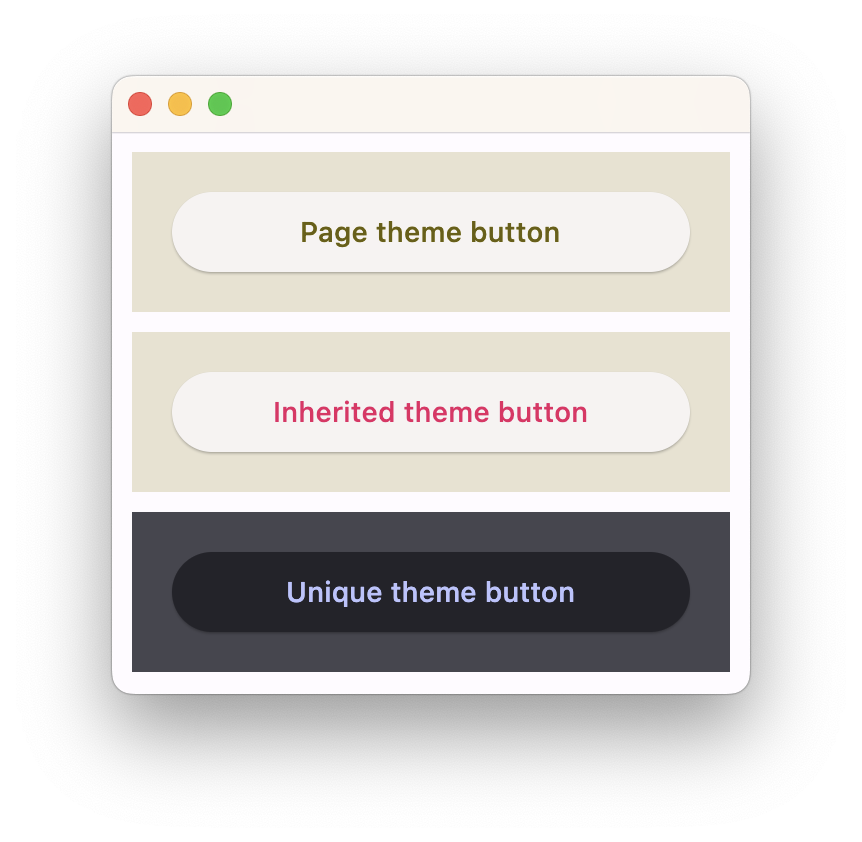
theme_mode
Setting theme_mode "resets" parent theme and creates a new, unique scheme for all controls inside the container. Otherwise the styles defined in container's theme property override corresponding styles from the parent, inherited theme.
Value is of type ThemeMode and defaults to ThemeMode.SYSTEM.
theme
Allows setting a nested theme for all controls inside the container and down the tree.
Value is of type Theme class.
Usage example
import flet as ft

def main(page: ft.Page):
    # Yellow page theme with SYSTEM (default) mode
    page.theme = ft.Theme(
        color_scheme_seed=ft.colors.YELLOW,
    )

    page.add(
        # Page theme
        ft.Container(
            content=ft.ElevatedButton("Page theme button"),
            bgcolor=ft.colors.SURFACE_VARIANT,
            padding=20,
            width=300,
        ),

        # Inherited theme with primary color overridden
        ft.Container(
            theme=ft.Theme(color_scheme=ft.ColorScheme(primary=ft.colors.PINK)),
            content=ft.ElevatedButton("Inherited theme button"),
            bgcolor=ft.colors.SURFACE_VARIANT,
            padding=20,
            width=300,
        ),

        # Unique always DARK theme
        ft.Container(
            theme=ft.Theme(color_scheme_seed=ft.colors.INDIGO),
            theme_mode=ft.ThemeMode.DARK,
            content=ft.ElevatedButton("Unique theme button"),
            bgcolor=ft.colors.SURFACE_VARIANT,
            padding=20,
            width=300,
        ),
    )

ft.app(main)
url
The URL to open when the container is clicked. If provided, on_click event is fired after that.
url_target
Where to open URL in the web mode.
Value is of type UrlTarget and defaults to UrlTarget.BLANK.
Events
on_click
Fires when a user clicks the container. Will not be fired on long press.
on_hover
Fires when a mouse pointer enters or exists the container area. data property of event object contains true (string) when cursor enters and false when it exits.
A simple example of a container changing its background color on mouse hover:
import flet as ft

def main(page: ft.Page):
    def on_hover(e):
        e.control.bgcolor = "blue" if e.data == "true" else "red"
        e.control.update()

    page.add(
        ft.Container(width=100, height=100, bgcolor="red", ink=False, on_hover=on_hover)
    )

ft.app(main)
on_long_press
Fires when the container is long-pressed.
on_tap_down
Fires when a user clicks the container with or without a long press.
Event handler argument is of type ContainerTapEvent.
If ink is True, e will be plain ControlEvent with empty data instead of ContainerTapEvent.
A simple usage example:
import flet as ft

def main(page: ft.Page):
    page.vertical_alignment = ft.MainAxisAlignment.CENTER
    page.horizontal_alignment = ft.CrossAxisAlignment.CENTER

    def on_long_press(e):
        print("on long press")
        page.add(ft.Text("on_long_press triggered"))

    def on_click(e):
        print("on click")
        page.add(ft.Text("on_click triggered"))

    def on_tap_down(e: ft.ContainerTapEvent):
        print("on tap down", e.local_x, e.local_y)
        page.add(ft.Text("on_tap_down triggered"))

    c = ft.Container(
        bgcolor=ft.colors.RED,
        content=ft.Text("Test Long Press"),
        height=100,
        width=100,
        on_click=on_click,
        on_long_press=on_long_press,
        on_tap_down=on_tap_down,
    )

    page.add(c)

ft.app(main)