CupertinoNavigationBar
An iOS-styled bottom navigation tab bar.
Navigation bars offer a persistent and convenient way to switch between primary destinations in an app.
Examples
A simple CupertinoNavigationBar
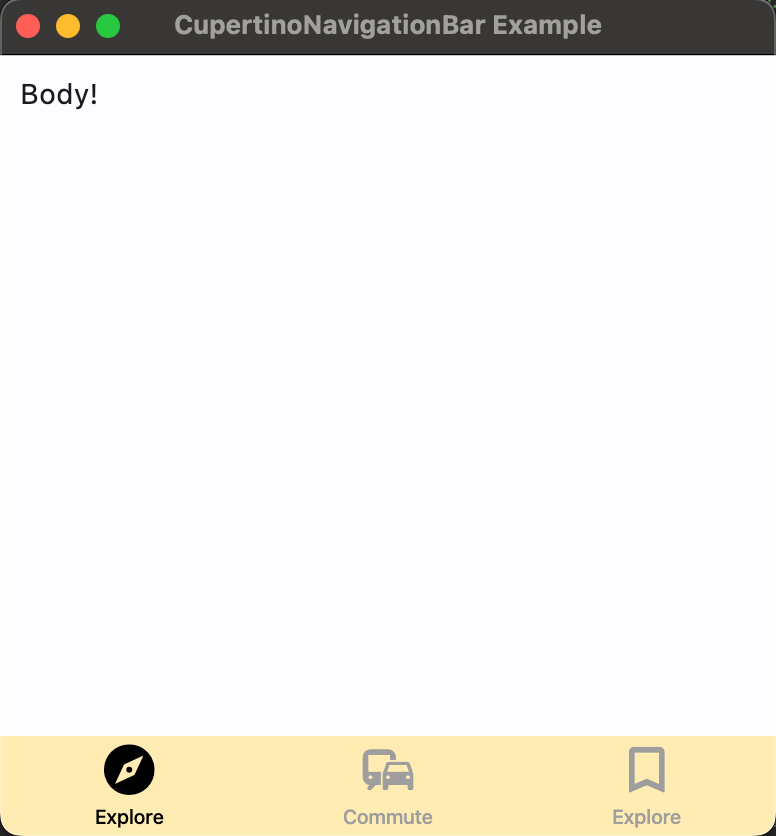
import flet as ft

def main(page: ft.Page):
    page.title = "CupertinoNavigationBar Example"
    page.navigation_bar = ft.CupertinoNavigationBar(
        bgcolor=ft.colors.AMBER_100,
        inactive_color=ft.colors.GREY,
        active_color=ft.colors.BLACK,
        on_change=lambda e: print("Selected tab:", e.control.selected_index),
        destinations=[
            ft.NavigationBarDestination(icon=ft.icons.EXPLORE, label="Explore"),
            ft.NavigationBarDestination(icon=ft.icons.COMMUTE, label="Commute"),
            ft.NavigationBarDestination(
                icon=ft.icons.BOOKMARK_BORDER,
                selected_icon=ft.icons.BOOKMARK,
                label="Explore",
            ),
        ]
    )
    page.add(ft.SafeArea(ft.Text("Body!")))


ft.app(main)
Properties
active_color
The foreground color of the icon and title of the selected destination.
bgcolor
The color of the navigation bar itself.
border
Defines the border of this navigation bar. The value is an instance of Border class.
destinations
Defines the appearance of the button items that are arrayed within the navigation bar.
The value must be a list of two or
more NavigationBarDestination instances.
icon_size
The size of all destination icons.
Defaults to 30.
inactive_color
The foreground color of the icon and title of the unselected destinations.
selected_index
The index into destinations for the current selected NavigationBarDestination or None if no destination is selected.
Events
on_change
Fires when selected destination changed.