MenuBar
A menu bar that manages cascading child menus.
It could be placed anywhere but typically resides above the main body of the application and defines a menu system for invoking callbacks in response to user selection of a menu item.
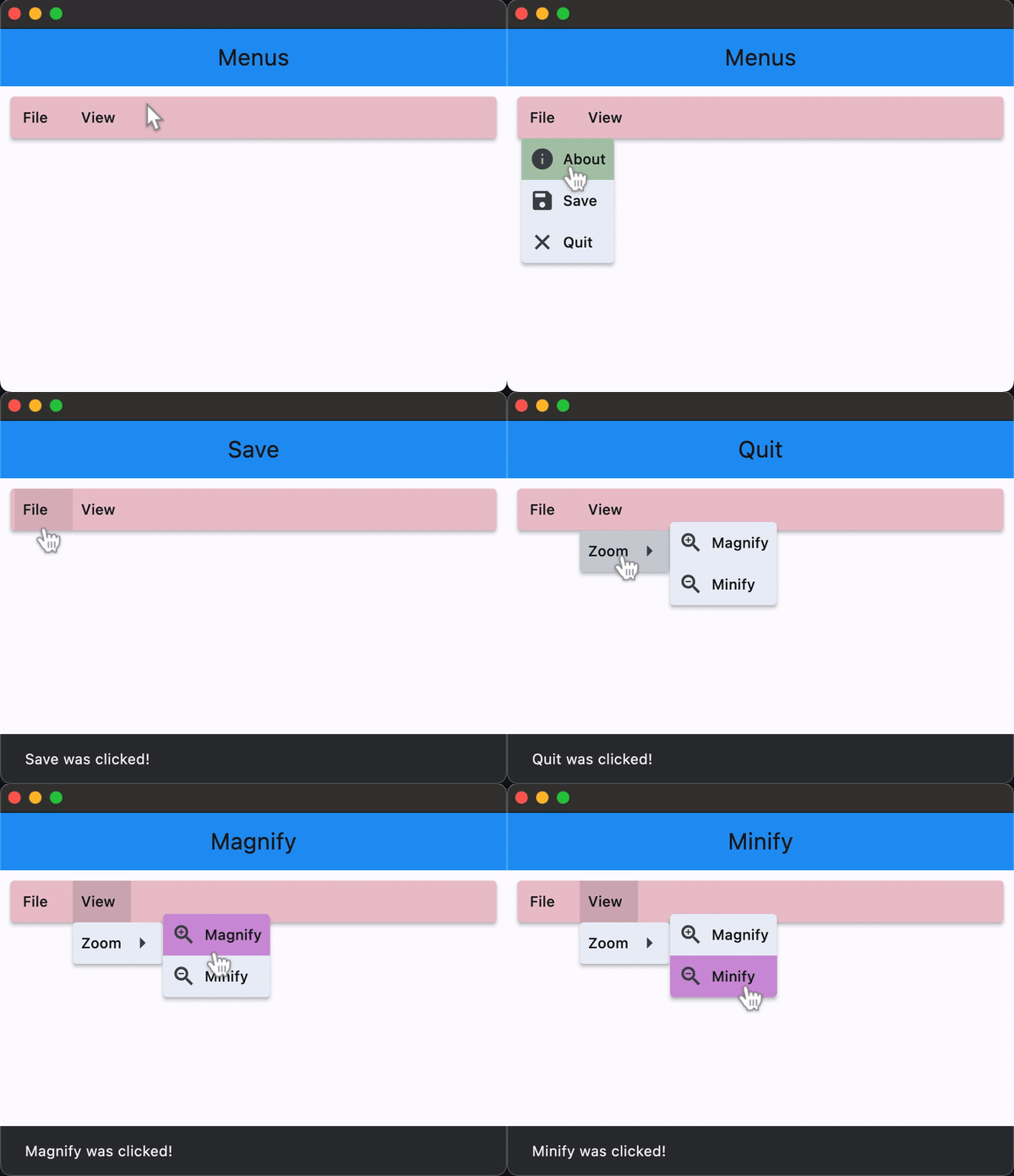
Examples
- Python
import flet as ft


def main(page: ft.Page):
    appbar_text_ref = ft.Ref[ft.Text]()

    def handle_menu_item_click(e):
        print(f"{e.control.content.value}.on_click")
        page.open(ft.SnackBar(content=ft.Text(f"{e.control.content.value} was clicked!")))
        appbar_text_ref.current.value = e.control.content.value
        page.update()

    def handle_submenu_open(e):
        print(f"{e.control.content.value}.on_open")

    def handle_submenu_close(e):
        print(f"{e.control.content.value}.on_close")

    def handle_submenu_hover(e):
        print(f"{e.control.content.value}.on_hover")

    page.appbar = ft.AppBar(
        title=ft.Text("Menus", ref=appbar_text_ref),
        center_title=True,
        bgcolor=ft.colors.BLUE,
    )

    menubar = ft.MenuBar(
        expand=True,
        style=ft.MenuStyle(
            alignment=ft.alignment.top_left,
            bgcolor=ft.colors.RED_300,
            mouse_cursor={
                ft.ControlState.HOVERED: ft.MouseCursor.WAIT,
                ft.ControlState.DEFAULT: ft.MouseCursor.ZOOM_OUT,
            },
        ),
        controls=[
            ft.SubmenuButton(
                content=ft.Text("File"),
                on_open=handle_submenu_open,
                on_close=handle_submenu_close,
                on_hover=handle_submenu_hover,
                controls=[
                    ft.MenuItemButton(
                        content=ft.Text("About"),
                        leading=ft.Icon(ft.icons.INFO),
                        style=ft.ButtonStyle(
                            bgcolor={ft.ControlState.HOVERED: ft.colors.GREEN_100}
                        ),
                        on_click=handle_menu_item_click,
                    ),
                    ft.MenuItemButton(
                        content=ft.Text("Save"),
                        leading=ft.Icon(ft.icons.SAVE),
                        style=ft.ButtonStyle(
                            bgcolor={ft.ControlState.HOVERED: ft.colors.GREEN_100}
                        ),
                        on_click=handle_menu_item_click,
                    ),
                    ft.MenuItemButton(
                        content=ft.Text("Quit"),
                        leading=ft.Icon(ft.icons.CLOSE),
                        style=ft.ButtonStyle(
                            bgcolor={ft.ControlState.HOVERED: ft.colors.GREEN_100}
                        ),
                        on_click=handle_menu_item_click,
                    ),
                ],
            ),
            ft.SubmenuButton(
                content=ft.Text("View"),
                on_open=handle_submenu_open,
                on_close=handle_submenu_close,
                on_hover=handle_submenu_hover,
                controls=[
                    ft.SubmenuButton(
                        content=ft.Text("Zoom"),
                        controls=[
                            ft.MenuItemButton(
                                content=ft.Text("Magnify"),
                                leading=ft.Icon(ft.icons.ZOOM_IN),
                                close_on_click=False,
                                style=ft.ButtonStyle(
                                    bgcolor={
                                        ft.ControlState.HOVERED: ft.colors.PURPLE_200
                                    }
                                ),
                                on_click=handle_menu_item_click,
                            ),
                            ft.MenuItemButton(
                                content=ft.Text("Minify"),
                                leading=ft.Icon(ft.icons.ZOOM_OUT),
                                close_on_click=False,
                                style=ft.ButtonStyle(
                                    bgcolor={
                                        ft.ControlState.HOVERED: ft.colors.PURPLE_200
                                    }
                                ),
                                on_click=handle_menu_item_click,
                            ),
                        ],
                    )
                ],
            ),
        ],
    )

    page.add(ft.Row([menubar]))


ft.app(main)
Properties
clip_behavior
Whether to clip the content of this control or not.
Value is of type ClipBehavior and defaults to ClipBehavior.NONE.
controls
The list of menu items that are the top level children of the MenuBar.
style
Value is of type MenuStyle.