CupertinoDialogAction
A button typically used in a CupertinoAlertDialog.
Examples
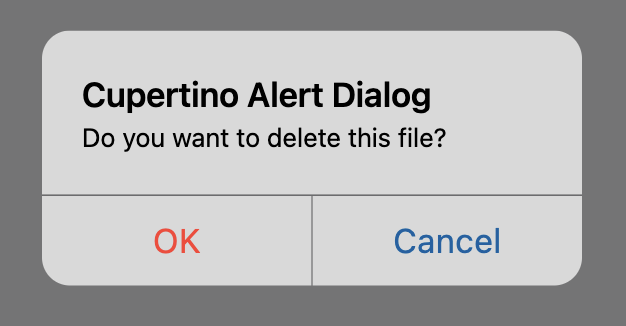
CupertinoAlertDialog example
- Python
import flet as ft


def main(page: ft.Page):
    page.horizontal_alignment = ft.CrossAxisAlignment.CENTER

    def dialog_dismissed(e):
        page.add(ft.Text("Dialog dismissed"))

    def handle_action_click(e):
        page.add(ft.Text(f"Action clicked: {e.control.text}"))
        page.close(cupertino_alert_dialog)

    cupertino_alert_dialog = ft.CupertinoAlertDialog(
        title=ft.Text("Cupertino Alert Dialog"),
        content=ft.Text("Do you want to delete this file?"),
        on_dismiss=dialog_dismissed,
        actions=[
            ft.CupertinoDialogAction(
                text="Yes",
                is_destructive_action=True,
                on_click=handle_action_click,
            ),
            ft.CupertinoDialogAction(
                text="No",
                is_default_action=True,
                on_click=handle_action_click
            ),
        ],
    )

    page.add(
        ft.CupertinoFilledButton(
            text="Open CupertinoAlertDialog",
            on_click=lambda e: page.open(cupertino_alert_dialog),
        )
    )


ft.app(main)
Properties
content
A Control representing custom button content.
is_default_action
If set to True, the button will have bold text. More than one action can have this property set to True in CupertinoAlertDialog.
Defaults to False.
is_destructive_action
If set to True, the button's text color will be red. Use it for actions that destroy objects, such as an delete that deletes an email etc.
Defaults to False.
text
The text displayed on a button.
text_style
The text style to use for text on the button.
Value is of type TextStyle.
Events
on_click
Fires when a user clicks the button.